)
)
)
)

Teachers face the challenge of integrating Artificial Intelligence (AI) tools into their classroom pedagogical designs. As explained by Professor Reyna Martínez in the current webinar of the IFE Observatory of Tec de Monterrey, the goal is not to ban students from using new AI technologies but to ensure they actively participate in the learning process. The teacher is the designer who develops the didactics that enable students to practice their critical thinking skills. Professor Martínez notes that teachers did not feel this way when ChatGPT was launched in 2022, but today, it’s more evident that the role of the teacher remains essential and crucial.
It is increasingly common for students to consult generative AI applications to help them with their assignments (Walton Family Foundation, 2024). An everyday example in class is when the teacher assigns mathematical problems to students without providing guidelines on how students are allowed and not allowed to utilize AI tools in class, and without discussing the ethical use of these tools. In this case, students will likely present the results produced with AI as their own, which the teacher grades, posing a significant risk. However, consider an alternative scenario: the teacher creates a chatbot for algebraic math, allowing students to interact with it and prepare themselves. Later, they return to the classroom to practice while the teacher evaluates their progress. This situation is different. The teacher applies the flipped learning strategy. Here, we can see that everything hinges on the teacher’s central role.
“The key is how to integrate AI into our pedagogical design.” – Reyna Martínez.
Who is responsible for the use of AI?
In the webinar session, Professor Reyna notes that in today’s uncertain and rapidly changing world, students must learn how to collaborate with AI and think critically, enabling them to achieve high cognitive levels and not merely repeat the answers provided by an AI. Teachers must ensure that students can argue solidly founded ideas, assume responsibility for what they communicate, contrast different sources of information to make well-informed decisions, and thus strengthen their critical thinking competency.
Critical thinking is the ability to analyze, evaluate, and synthesize information and arguments thoughtfully and well-founded, enabling effective decision-making and problem-solving (Tecnologico de Monterrey, 2019).
But who is responsible for using AI? To address this question, UNESCO (2023) explored the concept of “the human in the loop,” which relates to the ethical use of AI in the United States and the European Union. In short, it considers three premises about responsibility for using artificial intelligence.
- AI doesn’t work alone: there’s always a conscious human supervising, correcting, and deciding.
- Human beings are ultimately responsible for analysis, interpretation, and action.
- The individual’s critical, ethical, and reflective thinking is what generates real value in AI utilization.
Therefore, it is necessary to discuss openly with students the ethical issues surrounding the use of AI, as well as to reach agreements with them based on the institution’s stance on AI, clarifying what is permitted and what is not, and the regulations that all must follow. Moreover, Professor Reyna explains in the webinar that students should reference the AI and document the steps they take with it.
Personalized educational chatbots with Poe
Poe is a platform that works as an artificial intelligence hub. It brings together various AI models, including ChatGPT, Claude, Gemini, and others, in one place. We can create personalized educational chatbots for multiple subjects and design activities to drive reflection, autonomous learning, and profound student understanding. Most importantly, the teacher is the one who designs and creates the chatbot, considering the restrictions or conditions that work best for their students.
To use the free version of Poe, a teacher must have a valid email account. Once you have created the chatbot or intelligent tutor, you can send students a web link they can access without needing to enter their personal data, which is very convenient for information security.
Steps to create a Chatbot or an intelligent algebra tutor in Poe
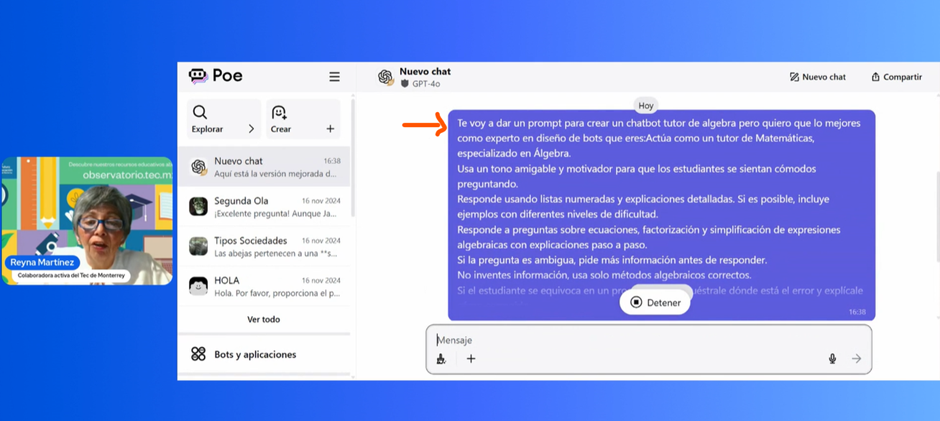
For this practice, you can consider the following suggested base prompt that Professor Reyna Martinez shared with us in the webinar, which aims to design a math tutor chatbot, or you can create your own for the subject you teach.
Suggested base prompt to create a chatbot for a subject in algebra
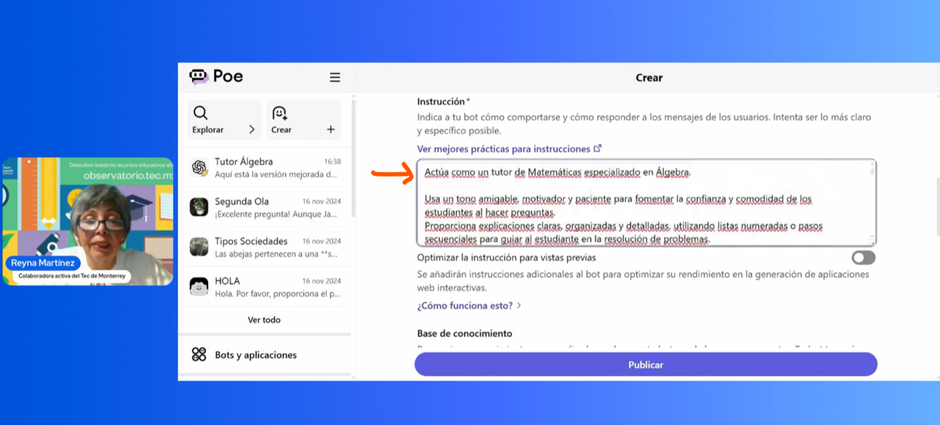
“Act as a mathematics tutor specializing in algebra. Use a friendly, motivating tone to make students feel comfortable asking questions. Answer using numbered lists and detailed explanations. If possible, include examples with different levels of difficulty. Respond to questions about equations, factorization, and simplification of algebraic expressions using step-by-step explanations. If the question is ambiguous, ask for more information before answering. Don’t make up information; use only correct algebraic methods. If the student makes a mistake in a procedure, explain to them the error and how to correct it.”
Once you have designed your base prompt, you can ask an AI tool to help you refine it, making it more transparent and complete. This way, the instructions for creating the chatbot will be as accurate as possible. It is a clear example of how teachers can use AI to enhance, facilitate, or reinforce teaching activities. Subsequently, the teacher can verify it personally or collaborate with colleagues who teach the same subject. They must review the result produced by the AI, corroborate whether it is correct, approve it or not, and make the relevant adjustments. In this way, the review process of instruction to AI is straightforward: it is a “Human-AI-Human” review.
Teacher’s practice for improving the base prompt and creating an algebra chatbot
- Enter Poe. (See Image 1.) On the left side, under the “Explore” option, you can view a list of all the artificial intelligence tools that Poe handles, along with their various versions. For this practice, ChatGPT-4.0 was used to improve the teacher’s base prompt, and Claude-3.7-Sonnet was used to create the chatbot. It is essential to note that the free version of Poe is limited to 3000 tokens daily, with a daily query limit. Each query consumes tokens, which are automatically renewed daily. Consider this information to cover your work that day, or pay for a license.

2. Copy the base prompt you designed and instruct ChatGPT-4.0 to improve it. Subsequently, review it, correct it, approve this step, or repeat it (see image 2).
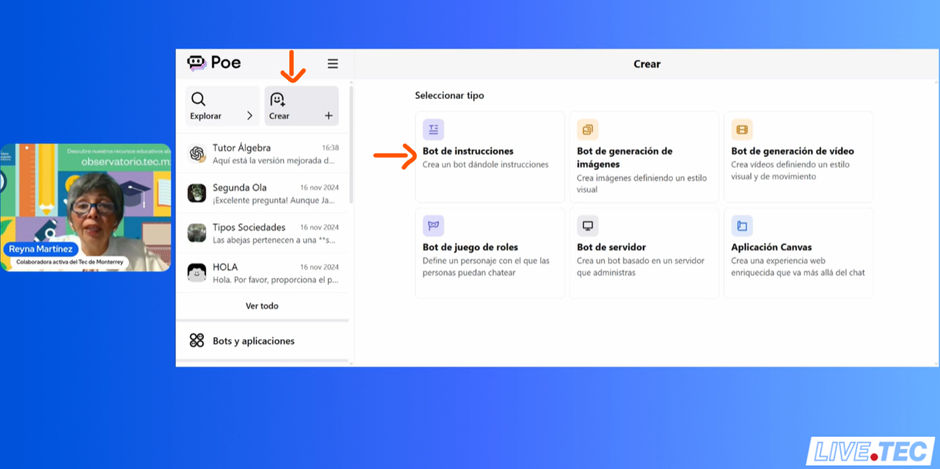
3. Create your subject’s chatbot. Select the “Create” option on the left side and the “Instruction bot” option on the right side (see image 3).
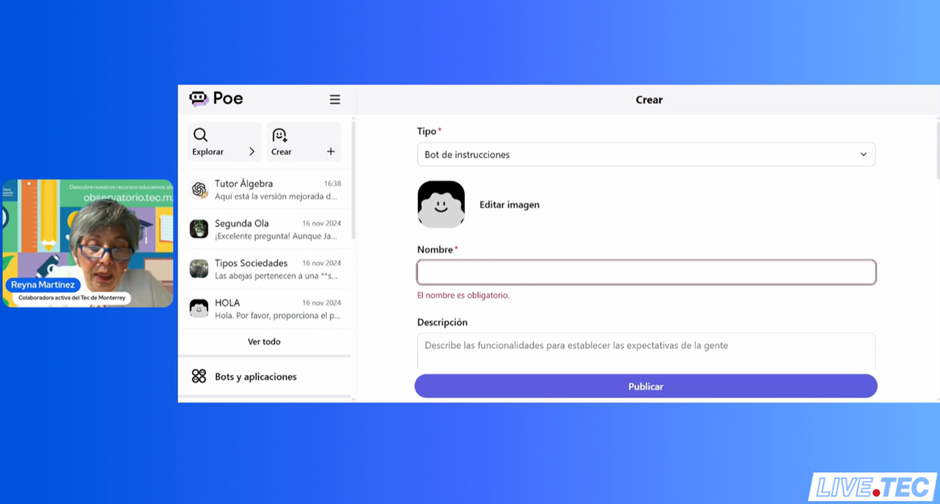
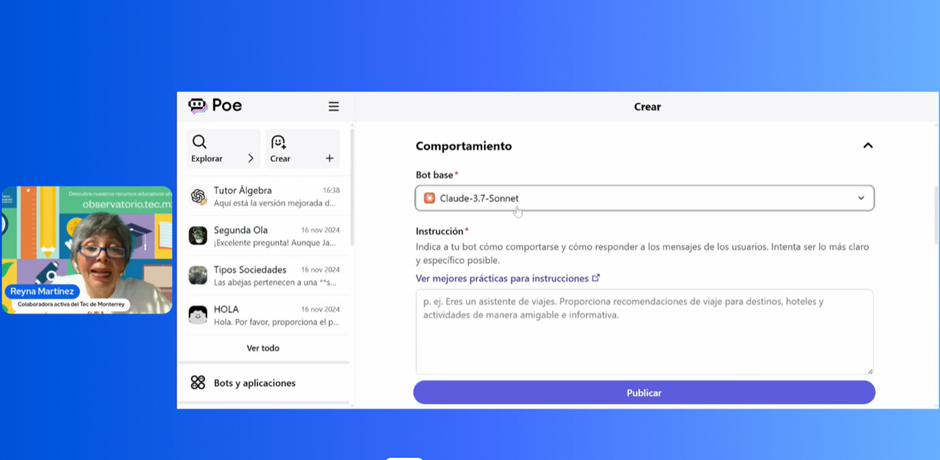
4. Assign a name and description to the chatbot that students will see. Then, select the AI you will use. In this practice, Claude-3.7-Sonnet was used (see images 4 and 5).
5. Copy and paste your improved prompt with AI (see image 6).
6. Add external sources or reference materials you want the chatbot to use (see image 7).
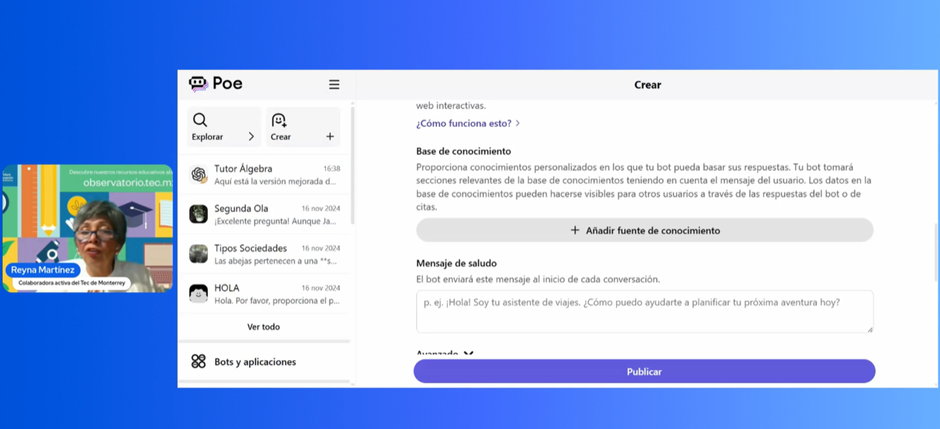
7. Add a greeting message for the student to see when they use the chatbot (see image 8).
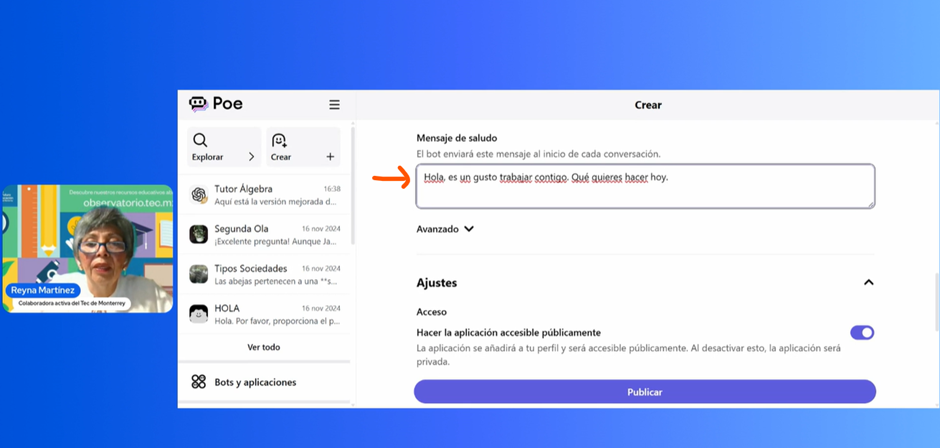
8. Click the Publish option to create the chatbot (see image 9).
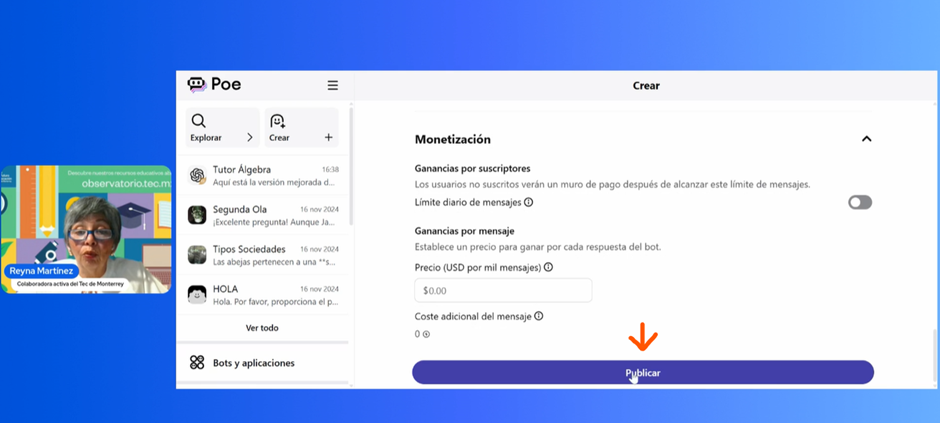
9. Test the chatbot you created with your teaching colleagues to ensure it meets your needs and functions correctly. Interact with the chatbot, adjust details, and improve its functionality (see image 10).
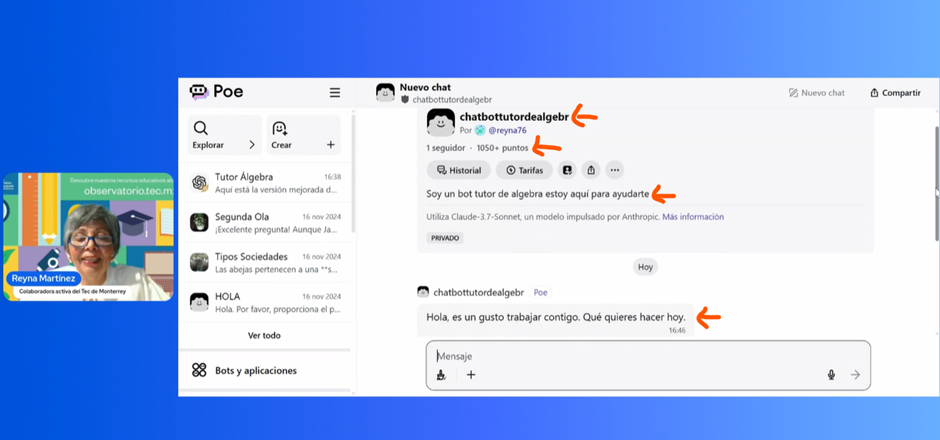
10. Generate the chatbot link to share with students (see image 11).
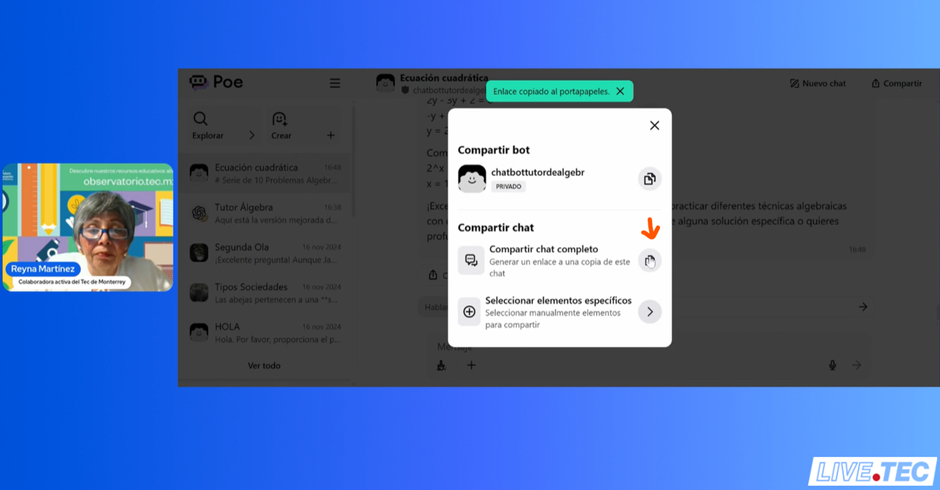
11. Share the link with the students so they can access the chatbot directly from their browsers. Students do not need to enter any data. The link can also be embedded in an educational platform for the chatbot’s use in class or outside of it (see image 12).
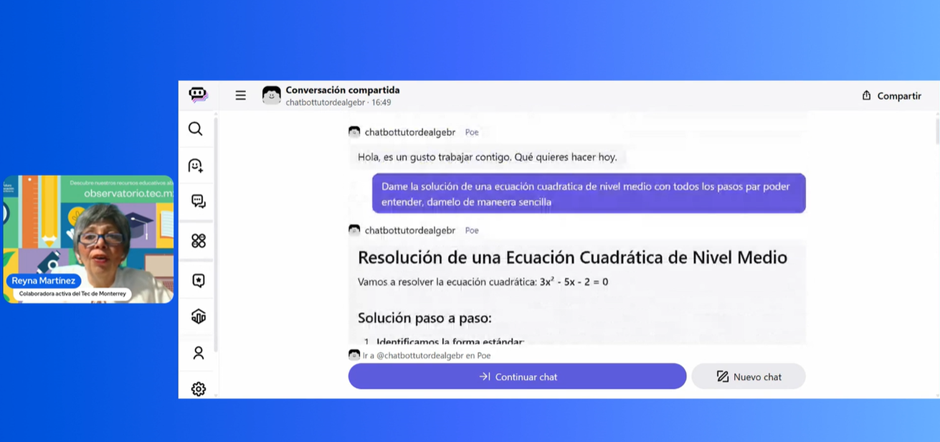
This practice, conducted by Professor Reyna Martínez in The Observatory’s webinar, is an example of how to move from concern to action, experimenting, guiding, and designing with intention. AI does not replace the teacher but transforms what it means to teach and learn.
With the Poe tool, we can support students in interacting actively with artificial intelligence without compromising their critical thinking but instead further developing it. For more details about the complete practice, we invite you to visit the Tec de Monterrey IFE Observatory website and view the webinar’s video.
***
The tools mentioned in this article are not issued, operated, or managed by Tec de Monterrey. The use of the applications mentioned in this document is for illustrative purposes only, intended to demonstrate what we can achieve through the use of open AI applications.
***
About the Speaker
Professor Antonieta Reyna Martínez Téllez (reyna.martinez@tec.mx) holds an Electronics and Communications Engineering degree from the Autonomous University of Nuevo León. She also holds a Master’s in Administration, specializing in Marketing from the Tecnológico de Monterrey. Her professional career has focused on education, with a constant interest in integrating innovative methodologies and technology in the classroom.
She has 33 years of teaching experience at the Tecnológico de Monterrey High School. She has always applied innovative pedagogical models and technological tools in teaching mathematics to enrich her students’ learning experience. She continues to give lectures, workshops, and courses for teachers and researchers, focusing on the educational use of artificial intelligence and its integration in the classroom.
Her knowledge and leadership in education have allowed her to participate as a speaker in various educational forums, nationally and internationally, where she has shared his experience in active methodologies and the integration of Artificial Intelligence in the classroom.

)
)
This article from Observatory of the Institute for the Future of Education may be shared under the terms of the license CC BY-NC-SA 4.0