

Integrating artificial intelligence (AI) into educational processes has become a watershed in modern education. Thanks to generative AI tools, learning experiences can be improved by personalizing and adjusting content or levels to students’ specific needs, optimizing tedious tasks for teachers, and alleviating the burden on institutions.
Studies report that AI applications, such as intelligent tutoring systems (ITS), adaptive learning systems (ALS), and robotics, enhance learning and academic achievement, especially in STEM areas.
However, it is not only a matter of knowing which intelligent tools can be used in the classroom but also of understanding the pedagogical strategies that should be applied in digital contexts with AI, what type of evaluations are required, how teachers should prepare, and the benefits, risks, and implications that the use of technology entails.
AI in Education
1. Types of AI techniques and systems in education
In education, generative AI develops intuitive, intelligent tools that facilitate curriculum design, optimize tasks (such as assessments), and support other activities. The advanced AI techniques and systems are divided into four main types (Kwid et al., 2024):
- Machine learning (ML): This technique uses statistical algorithms to build prediction models that process large amounts of data. Some examples of ML use in education include automated assessment systems and early-detection systems that identify students with academic difficulties who are at risk of dropping out. In addition, initiatives have been implemented to teach machine learning principles in primary education, such as modeling and algorithmic biases, through programs such as PictoBlox.
- Intelligent Tutoring Systems (ITS): These tools help tailor learning to specific needs, provide personalized feedback, and have the potential to engage students in the learning process actively. An example of this is DreamBox, which includes support so students can learn and progress in assigned content through its guidance and personalization in areas like mathematics and reading.
- Automated Essay Scoring (AES): These applications simulate the human brain’s processing capabilities so that they can recognize complex patterns in large multivariate datasets to grade academic texts.
- Natural Language Processing: The educational applications in this AI subfield include spell checking, translation, recommendation systems, and conversational agents (chatbots). A concrete example of this type of system is ChatGPT.
2. Functions of AI in education
Now that we have seen the AI techniques/systems that can be implemented in educational contexts, we can review the functions these systems fulfill in education (Kwid et al., 2024).
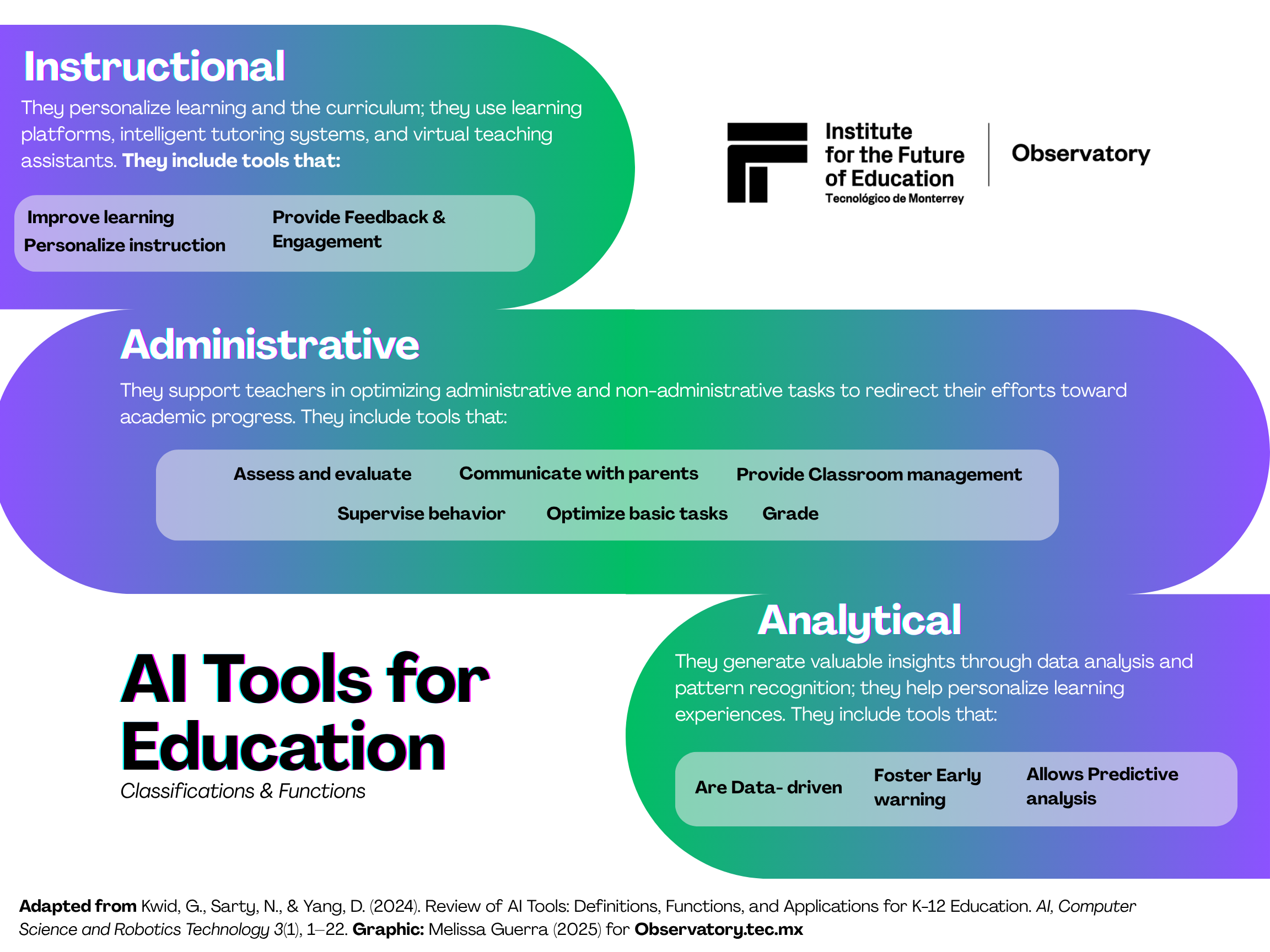
- Improving teaching and learning
One of the most common functions of intelligent systems in education is to improve teaching and learning processes, as they “increase the capacity of teachers, helping them to deliver effective instruction” (Kwid et al., 2024). In this sense, when used correctly and responsibly, AI can complement instruction, personalize learning paths, automate assessment processes, and optimize learning platforms, resulting in more adaptive learning (Kwid et al., 2024).
Intelligent systems can improve instruction through virtual tutors, content creation tools for curriculum design, lesson plans, teaching materials, audio, and tools specifically designed for education — tools created for academic purposes that improve students’ attention and facilitate learning.
Kwid et al. (2024) note that “AI has a positive effect on students’ learning outcomes… improving accessibility and creating more effective learning environments, making education more inclusive and responsive to the needs of students.”
- Personalized instruction
Personalized or differentiated instruction is enabled by algorithms that adapt the learning process to each student’s specific needs, including their preferences and learning rhythms (Ayeni et al., 2024, as cited in Kwid et al., 2024). Some AI-powered solutions for differentiated instruction include:
- Interactive learning platforms (such as ALS) adapt to student progress, learning sequence, and task difficulty.
- Chatbots, which provide opportunities for individualized and specific learning, involving students in the process; they provide immediate feedback and are available 24/7 (Okonkwo et al., 2021; Jurafsky et al., 2023, as cited in Kwid et al., 2024).
Therefore, “larger-scale, personalized instruction, powered by innovative AI, allows more students to access high-quality instruction that might not be possible with traditional face-to-face methods” (Kwid et al., 2024). Accordingly, personalized instruction not only optimizes teachers’ evaluation and instruction time but also allows teachers to accompany and support students with different rhythms and ways of learning, with the ease of continuous, immediate feedback, which is often impossible for teachers due to time constraints and large class sizes, among other factors.
- Assessment and evaluation systems
“Automated assessment systems are becoming one of the most prominent and promising applications of machine learning in primary and secondary education” (Kwid et al., 2024). These systems facilitate the assessment of academic texts, exams, assignments, and related materials, thereby reducing workload. For example, automatic evaluation systems (AES) can identify text patterns using supervised learning algorithms (trained with essays graded by humans) to evaluate and provide adequate feedback on academic texts. Kwid et al. (2024) report that some self-assessment programs include DreamBox, School AI, and iReady.
- Early prevention and predictive analysis system
Thanks to learning analytics, early detection and predictive analysis systems can be developed to identify at-risk students, helping prevent them from falling behind and dropping out of school. In this sense, Latif et al. (2023, as cited in Kwid et al., 2024) state that “machine learning techniques, together with initial assignments and early semester quizzes, can predict grades in midterm and final exams;” thus, AI systems can assist in the early detection of at-risk students, which is often impossible or too late in traditional teaching contexts that do not use prediction algorithms.
3. AI Tools Classification
Kwid et al. (2024) established a classification of AI tools to understand the types available and how they are organized across education and other fields so that teachers can select and use the ones that best fit the needs of their educational work.
Examples of AI tools in K-12 education (Kwid et al., 2024)
- ChatGPT
ChatGPT is one of today’s most widely used LLMs (Large Language Models). Its ability to create, summarize, discover, and more makes it one of the most versatile tools on the market. The quality of the prompt determines the effectiveness of its responses. Although this type of LLM provides quick, convenient information, it should always be validated, as it can hallucinate or invent information. This model is among the most secure because it can opt out of sharing data with OpenAI to train its AI models.
- Skill Struck’s Chat for Schools
This platform offers an environment similar to ChatGPT; however, it was designed especially for education. Its design has barriers to ensure data privacy and security. The functions of Chat for Schools include creating lesson plans, monitoring interactions with ChatGPT, using the Tutor option to solve problems and ask questions, and more. This tool allows teachers to view and monitor student chats and receive notifications when specific words are detected.
- Class Companion
This tool provides immediate, personalized feedback on written assignments. Class Companion aims to attract students and encourage them to practice writing at their own pace, letting them make mistakes and learn from them. Teachers can monitor the process, access integrated resources, and generate rubrics. This tool also offers strong security and complies with COPPA laws (which protect the privacy of children under 13 online). Class Companion affirms that the data is not sold or provided to third parties.
- Microsoft Copilot
Microsoft Copilot is intended to improve productivity and creativity. Its varied uses include a classroom management system for supervising learning, creating lesson plans with Copilot Notebooks, organizing graphics or notebooks, and communicating with parents. This tool does not store data in the system, so it is safe for minors.
- Diffit for Teachers
This tool has been discussed before in the Observatory, but broadly speaking, Diffit for teachers is a platform that adapts content (PDF, URL, YouTube, etc.) to a specific educational level, tailoring it to students’ needs, and integrates it with translations and vocabulary boxes, among other features. You can also create activities based on prior knowledge or search for lessons offered by verified sources. It has a library of ready-to-use activities available for download. Notably, all sources and references Diffit uses are cited and verified so that any teacher can consult the information. This FERPA and COPPA-compliant tool does not collect student data or sell the information to third parties.
- Discovery Education’s Dreambox Learning
Dreambox Learning serves as a personal tutor for math and reading. Its online supplemental program offers adaptive instruction for elementary and middle-school students. However, this tool lacks a robust data security system. Dreambox Learning collects and stores student information, a crucial aspect to consider.
- Eduaide.AI
This tool has also been previously discussed in an Observatory article. This platform can be used for multiple tasks, such as creating lesson plans and assessments, locating teaching resources, providing feedback, and tailoring resources to student needs. In addition, the information is provided in more than 15 languages.
- Magic Design by Canva
This is a handy design tool for creating personalized and engaging content. “Magic Design gives users the option for AI to design unique graphics, presentations, and videos based on user-entered prompts and text” (Kwid et al., 2024). In addition, Canva for Education protects user data, so it cannot be used to train AI models.
- MagicSchool
This tool is another AI education platform mentioned in the Observatory. MagicSchool is one of the most complete out there. It can be used for administrative and day-to-day tasks in the classroom. It integrates a chatbot, Raina, which helps with platform interactions and offers suggestions. The latest update includes a student version—a learning platform under a teacher’s supervision.
- Google’s Teachable Machine
This ” tool makes it easy and faster to create machine learning models for your projects, without the need for programming” (Google Creative Lab, 2019). According to Vartiainen et al. (2020, as cited in Yim & Su, 2025), children aged 3 to 9 benefited from interacting with this platform, as it fostered their intellectual curiosity, helped them develop computational thinking, and improved their understanding of machine learning.
- Scratch
This programming software is based on learning blocks and allows primary and secondary school students to learn about computational thinking, sequence programming, and rule-based and condition-based mechanisms.
The field of AI in Education (AIED) can be an effective ally for optimizing tasks, creating content, etc., when it is used responsibly and ethically. Authors such as Crompton et al. (2022) note significant challenges when implementing AIED go beyond the technical, such as the potential for these systems to distract, include bias, etc. In addition, there are technological and cost barriers (since many tools are not free or are no longer free), including students’ lack of digital skills or literacy, lack of teacher AI preparation and training in digital literacy, among other key, relevant issues when implementing technology-based programs.
However, AIDE should not be discussed solely in terms of challenges or barriers, as it also has benefits that have gradually been revealed through scientific research. Regarding this, studies report favorable results in motivation, self-efficacy, confidence, critical thinking skills, and computational thinking. As always, it is recommended to review the tools, their pros and cons, and establish how AI will be used in class, to avoid students depending on these tools at an early age.
Translation by Daniel Wetta